
FHF Bot provides a seamless and powerful solution for managing temporary voice channels on your Discord server — automatically, effortlessly.
Why FHF Bot
A complete voice channel management system — zero configuration for your users.
Channels are created on demand and deleted automatically when empty, keeping your server clean.
Configure channel names, limits, permissions, and more to fit your community perfectly.
Users can lock, hide, or restrict their channels with simple commands.
Built for speed and stability — no delays, no downtime, just smooth voice channel management.
Get started
Up and running in under 2 minutes — no complex configuration needed.
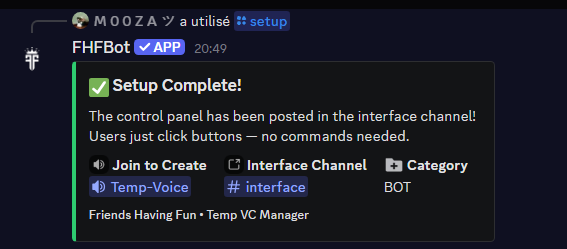
/setup and you’re liveAn admin runs /setup and picks three things: the Join-to-Create voice channel, the interface text channel, and an optional category. That's it — the bot handles everything else automatically.

FHF Bot replies with a Setup Complete message showing your Join to Create channel, Interface Channel, and Category. No manual configuration, no confusion.
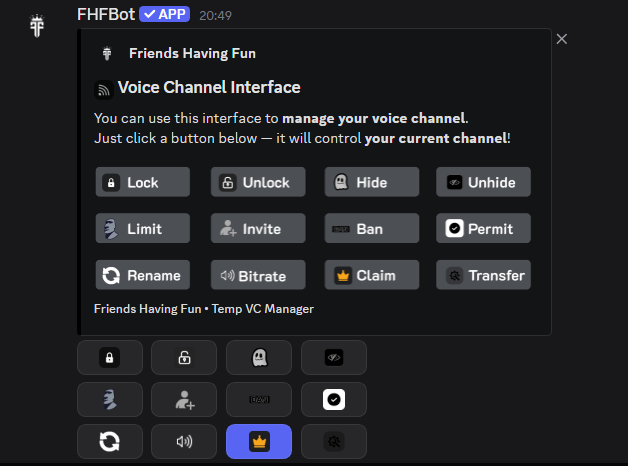
Every user gets a persistent Interface panel with buttons to lock, hide, rename, limit, ban, and more — all without typing a single command.
Controls
All controls are available directly in the Interface channel — no commands to memorize, just click a button.
Upgrade
Get more out of your voice channels. Upgrade anytime, cancel anytime.
Free
All the essentials to manage your voice channels — completely free, forever.
Premium
Unlock the full FHF Bot experience across every server you join. Check your active access and end date anytime with /premium in Discord.
FAQ
Quick answers to what people ask most.
Simply join the ➕ Join to Create voice channel set up by your server admin. A private room named "Your Name's Room" will be created for you automatically.
The channel is automatically deleted when the last person leaves. No leftover channels, no mess — your server stays clean at all times.
Yes! All controls are available through the Interface panel — a persistent message in a dedicated text channel with buttons for every action. No slash commands needed.
Use the Claim button in the Interface panel. It becomes available as soon as the original owner has left the channel, letting the next person take control.
FHF Premium ($1.99/mo) unlocks persistent channels that stay alive when empty, and a name database to save & reuse up to 3 channel names — all across every server you join. Subscribe via the Discord App Directory.
Run /premium in any server with FHF Bot. The bot reads your active Discord entitlement and shows its end date when Discord provides one. Persistent channels return to normal behavior when Premium access ends.
An administrator runs /setup and selects three channels: the Join-to-Create voice channel, the interface text channel, and an optional category. The bot does the rest automatically.